Clock, Date and Weather Widget
- 3.7
- Rating
- 100.00K
- Installs
- Free
- Price
 Analysis by App-foxy
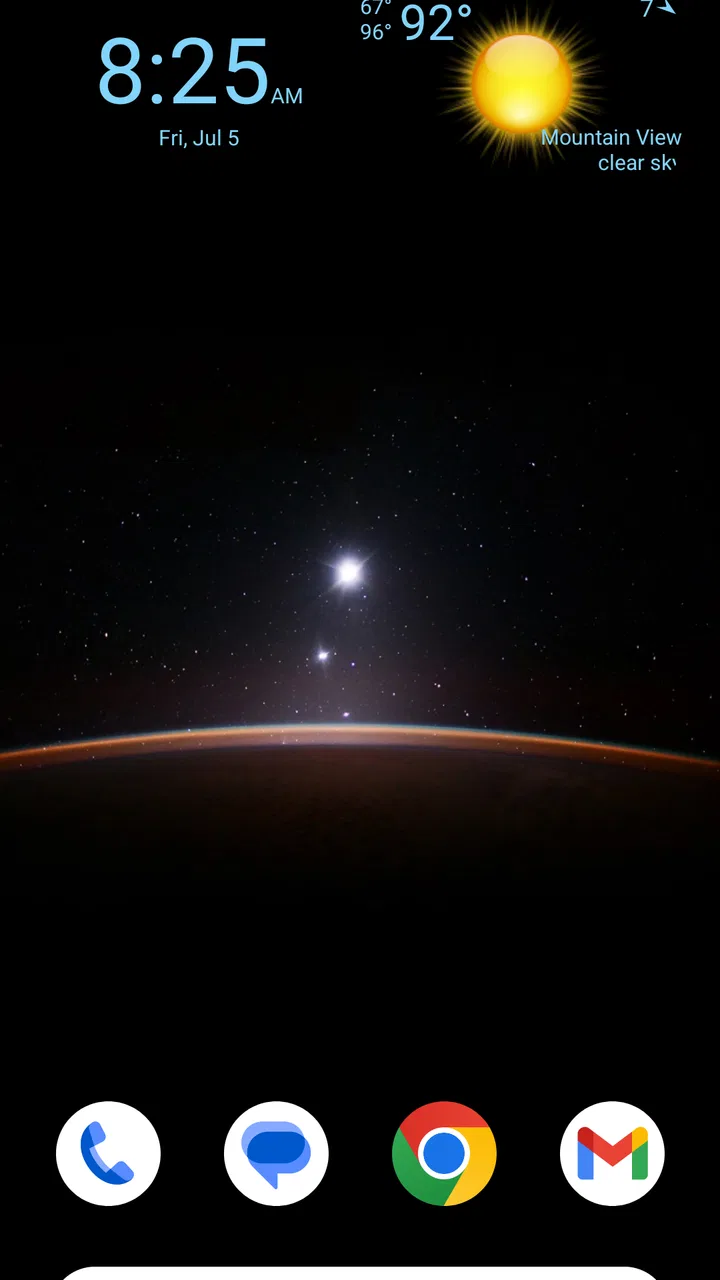
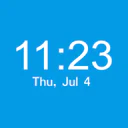
I like home-screen widgets that earn their space, and Clock, Date and Weather Widget takes a very direct approach. Instead of trying to become a complete weather service, it places three pieces of information where I usually look first: the time, the date, and the current weather. That simplicity is the app’s main appeal, but it also defines its limits. If you want a clean glanceable display without opening a full forecast app, it is worth considering. If you need detailed predictions, alerts, maps, or a large collection of customization tools, this is probably too modest.
After using it as a daily weather and time shortcut, my overall impression is that the app works best as a small layer of convenience rather than a replacement for a dedicated weather application. The developer is listed as aac, and the app belongs to the weather category even though its clock and date functions are just as important to the experience. It is free to install, carries an Everyone content rating, and has reached over one hundred thousand installs. Its average rating sits at about 3.7, which feels consistent with an app that solves a narrow problem well for some people while leaving others wanting more.
What the widget does well on a busy home screen
The strongest part of Clock, Date and Weather Widget is its purpose. I do not have to unlock the phone, find a weather icon, wait for a screen to load, and then search for the current conditions. The information is intended to sit directly on the home screen, so the useful question is answered at the moment I need it: what time is it, what day is it, and what is the weather like right now?
You May Also Like

 Blood Strike: 2.5 Anniversary
Blood Strike’s Loadouts Turn Every Drop Into a Tactical Gamble
A close look at Blood Strike’s custom loadouts: how fast access to signature weapons reshapes its battle royale rhythm, rewards preparation, and narrows the gap between fights.

 Pandora - Music & Podcasts
Pandora’s Music Is Easy to Start, but Harder to Recover
Pandora’s strength is its low-effort path from a seed to a station. Its weak spot is how much confidence it asks you to place in connection, setup, and quiet recovery.

 8 Ball Pool
 Is Built on Rivalries, Rematches, and Routine
A close look at the rivalries, rematches, shared routines, and unanswered safety questions that turn a quick pool match into a persistent mobile community.

 Samsung Music
’s Quiet Strength Is Playing What You Already Own
Its reach comes less from spectacle than from dependable access to a personal library. That simplicity is both the app’s strongest retention engine and its ceiling.

 AccuWeather: Weather Radar
AccuWeather Review: A Quick, Clear Forecast for Everyday Decisions
For everyday plans, the best forecast is the one you can understand quickly. AccuWeather makes rain timing, radar, and local conditions easy to act on, with a few trade-offs.

 Hill Climb Racing
Why Hill Climb Racing Still Turns Crashes Into One More Run
A tiny car, a bumpy hill and one more upgrade: Hill Climb Racing keeps resurfacing because its simple chaos makes every near-miss feel personal.
More From Our News Desk



That makes it particularly practical during small decisions throughout the day. Before leaving for work, I can check whether the conditions look comfortable without opening a full forecast. When I am arranging an appointment, the date is visible alongside the clock instead of requiring a separate calendar glance. In the evening, the same compact arrangement helps me decide whether I need another layer before going outside. None of these actions is dramatic, but repeated small conveniences are exactly what a widget should provide.
I also appreciate that the app does not appear to ask me to change my whole routine. It is not trying to replace the phone’s clock, calendar, or weather service with a complicated dashboard. The concept is easier to understand than many weather tools: place the widget, look at it, and move on. That low-friction design is useful for people who prefer information at a glance and do not want a crowded home screen full of separate shortcuts.
The combination of time, date, and weather is more useful than a weather-only widget in several situations. A weather widget can tell me whether conditions are warm or cold, but the date helps when I am checking a delivery day, planning an outing, or confirming that I have not opened an old notification. A clock widget can show the time, but it cannot help me decide whether a jacket is sensible. Bringing the three together gives the space a clear job.
One of the less obvious advantages is that the arrangement can reduce app switching. I often notice the weather while checking the time, rather than making a separate decision to consult a forecast. That matters when I am walking out the door or trying to keep a quick task quick. The widget is most successful when I treat it as a visual prompt, not as a place to conduct a long weather investigation.
A useful routine for mornings and short trips
My favorite everyday use is a simple morning check. I look at the widget while preparing to leave, compare the current conditions with what I expected, and then decide whether I need an umbrella, warmer clothes, or a lighter jacket. If the weather looks uncertain, I can still open a full weather app for more detail, but the widget handles the first decision without adding another step.
This workflow also works for parents, commuters, students, and anyone who moves between indoor and outdoor activities. A person heading to a class can check the date and conditions together. Someone leaving for a short errand can avoid opening several apps. The app is not valuable because it provides an elaborate analysis; it is valuable because it puts a basic answer in a familiar location.
There is a practical trade-off here. A widget occupies home-screen space, so its usefulness depends on whether that space is more valuable than another shortcut. On a minimal layout, the combined display can feel efficient. On a crowded layout, it may compete with messaging, calendar, music, or navigation tools. I would place it on the first screen only if I regularly check weather before going out. Otherwise, a smaller clock or the phone’s built-in weather glance may be a better use of the area.
Where it fits beside ordinary weather apps
Compared with a conventional weather app, this tool is quicker for current conditions but weaker for planning. A full weather service is usually the better choice when I need hourly changes, several-day forecasts, severe-weather information, radar, or location-based detail. Clock, Date and Weather Widget is better when I want a persistent reminder on the home screen and do not want a separate interface between me and the information.
That distinction is important because the word “weather” can create expectations. I would not install this expecting a complete meteorological workspace. I would install it because I want weather to remain visible beside the date and time. The app’s value comes from placement and convenience, not from replacing every weather feature found elsewhere.
It also differs from using separate built-in widgets. Many phones already offer a clock, calendar, and weather widget, but those elements may be split across different designs or take up more room when placed separately. This app’s combined idea can be tidier. On the other hand, a phone’s native widgets may integrate more naturally with the operating system and may be preferable if I already like their appearance and behavior. The choice is less about raw capability and more about whether this particular combined presentation suits my home screen.
Small decisions that affect the experience
Widget apps are easy to underestimate because the visible result is simple, but placement matters a great deal. I would test it on the home screen where I naturally pause, rather than hiding it on a secondary page. I would also avoid placing it beside several other information-heavy widgets. The purpose is quick recognition, and a busy surrounding layout can make even a clear widget feel less readable.
Another useful habit is to treat the display as a current snapshot. If I am making a decision that depends on changing conditions, I would open a more detailed weather source instead of relying only on the widget. This is not a criticism of the basic concept; it is the correct boundary for a glanceable display. The widget can start the decision, but it should not be the only source for a long trip or an important outdoor plan.
The app supports devices running Android 6.0 or newer, which makes it accessible to people using older Android hardware as well as more recent phones. The current version is 1.1.1. For someone with an older device who wants a straightforward home-screen utility, that compatibility is useful. For someone expecting the newest platform-specific styling or deep integration with a modern phone, the experience may feel less ambitious.
The meaningful weakness: convenience is not the same as depth
The main weakness is the narrow amount of information available from the widget itself. I can see the appeal of a compact display, but compactness means compromises. If I want to understand how conditions will change later in the day, the widget is unlikely to answer that need on its own. I still need another weather source for planning, and that can make this app feel like an extra layer rather than a complete solution.
There is also a possible setup trade-off for people who are sensitive to home-screen consistency. A widget has to look comfortable beside the phone’s existing icons and other widgets. If its visual treatment does not match a particular launcher or personal layout, the information may be useful while still feeling out of place. That is a subjective limitation, but it matters because the app’s entire purpose is to remain visible all day.
I would also be careful about assuming that every weather glance is enough for every situation. A current condition can be reassuring while a later change creates the real problem. Before a hike, a long drive, or an outdoor event, I would use a detailed forecast and any relevant alerts. This widget is strongest for ordinary, low-stakes decisions and weakest when I need depth, context, or confidence over several hours.
The free model makes trying it easy, but the listing includes in-app purchases priced at $5.99 per item. That does not automatically make the app poor value, yet it means I would pay attention to what I actually need before purchasing anything. For a simple time-date-weather glance, the free experience may be enough for many users. Someone considering an in-app purchase should judge it against the cost and convenience of the phone’s existing widgets or a full weather application rather than assuming extra spending is necessary.
That pricing detail also reinforces my view of the app’s audience. If the widget becomes a central part of a home-screen setup and offers something I cannot get comfortably elsewhere, an optional purchase may feel reasonable. If I only want the current temperature occasionally, the built-in tools already available on many phones may be the more sensible route. The app needs to save me enough daily effort to justify paying beyond the free starting point.
Who should install it, and who should skip it
I would recommend Clock, Date and Weather Widget to someone who checks the time repeatedly, wants the date visible, and makes frequent quick decisions about going outdoors. It is especially suitable for users who prefer a calm home screen with one purposeful information block instead of separate clock, calendar, and weather tools. It can also suit people using older Android phones, since Android 6.0 is the minimum operating system requirement.
It is a good fit for a commuter who wants a quick departure check, a student who needs the date visible while organizing the day, or a household member who wants weather information without navigating a detailed forecast interface. The app’s simplicity is an advantage for anyone who values speed over exploration.
I would skip it if my main goal is serious weather planning. Outdoor workers, travelers, hikers, and people who rely on weather warnings will likely be better served by a dedicated forecast application with the depth they need. I would also skip it if my phone’s existing clock and weather widgets already provide a clean combined view. Installing another widget only makes sense when it improves the way I actually use the home screen.
People who dislike persistent information on their first screen may not enjoy it either. The widget is designed to be seen, so it is not ideal for someone who prefers a completely empty or purely shortcut-based layout. Likewise, users looking for extensive customization should approach it cautiously and decide whether the core display is enough before committing space or money.
My final view after using the app as a daily glance
Clock, Date and Weather Widget succeeds because it understands a small but real need: I often want the current time, the date, and a quick weather impression at the same moment. Its best feature is not complexity; it is the reduction of tiny interruptions. When placed well, it turns a home-screen glance into a useful routine.
My recommendation is therefore specific rather than universal. Install it if you want a focused, combined widget and are happy to open another app when weather planning becomes important. Do not choose it as your only weather tool, and do not assume a compact display can replace forecasts or alerts. The free entry point makes it easy to test, while the optional purchases mean I would first confirm that it genuinely improves my daily layout.
With an average rating of about 3.7 from roughly five hundred ratings and around forty written reviews, the reception suggests a useful but not flawless utility. That feels fair to me. Its real strength is dependable glanceability, not weather analysis. For the right home screen, that is enough to make it worthwhile; for anyone seeking a complete weather experience, a more specialized alternative remains the better choice.
FAQs for Clock, Date and Weather Widget
01What features does the Clock, Date and Weather Widget offer?
The Clock, Date and Weather Widget provides a customizable interface displaying the current time, date, and weather conditions. It includes features like temperature forecasts, weather alerts, and various themes and styles to match your home screen. Users can also set alarms and reminders directly from the widget.
02Is the Clock, Date and Weather Widget free to use, or does it require a purchase?
The widget is available for free with basic features. However, there is a premium version offering additional themes, ad-free experience, and advanced weather forecasts. Users can choose to upgrade via in-app purchases if they desire these extra functionalities.
03How accurate is the weather information provided by the widget?
The widget sources its weather data from reliable meteorological services, ensuring up-to-date and accurate forecasts. Users can expect precise information regarding temperature, humidity, and weather alerts. However, like any weather service, minor discrepancies might occur due to sudden changes in weather conditions.
04Does the widget significantly impact battery life or device performance?
The Clock, Date and Weather Widget is optimized for minimal battery consumption and efficient performance. It updates information at regular intervals, which can be adjusted in settings to further conserve battery. Most users report no noticeable impact on device performance or battery life.
05Can the widget be customized to fit different home screen layouts?
Yes, the widget offers extensive customization options. Users can adjust the size, theme, and style to fit their device’s home screen layout. There are multiple color schemes and font styles available, allowing the widget to blend seamlessly with any aesthetic preference.
Pros
- Customizable interface with various themes.
- Accurate weather data updated frequently.
- Easy-to-read clock and date display.
- Minimal battery consumption for daily use.
- Widgets are resizable to fit any screen size.
Cons
- Limited free features; premium needed for more.
- Occasional lag when updating weather info.
- Ads can be intrusive in the free version.
- Lacks integration with some weather services.
- Some themes may not suit all tastes.

Clock, Date and Weather Widget
Gallery